Stocky has shut down. Keep your workflow.
Restock brings purchase orders, barcode receiving, stocktakes and labels to Shopify POS — the way Stocky did them. Flat pricing, no forecasting bloat, nothing new to learn.
14 days free · $29/mo after · Cancel from your Shopify admin
After that date the app stops working — though Shopify keeps a read-only export window open for at least 90 days. What ends on the 31st with no grace is the Stocky API, and suppliers can only come out through it. The export guide covers what to pull out; the move itself takes an afternoon. Shopify has retired Stocky. Its read-only export window stays open for at least 90 days after the shutdown, so your data is probably still reachable — the export guide covers getting it out, and the migration guide covers bringing it in. Either way, Restock reads what is still in Shopify: products, barcodes, cost per item and inventory levels.
01 — What carries over
Everything Stocky did, where you already work.
The workflows retail stores actually use, rebuilt one for one. No forecasting dashboards, no “insights” — the tools, as you know them.
/ 01
Purchase orders
Create POs, email them to suppliers as PDFs, track what’s outstanding. Same fields, same flow.
/ 02
Barcode receiving
Scan cartons in at the till or in the stockroom. Partial receipts handled, discrepancies flagged.
/ 03
Stocktakes
Count by section with a scanner, review variances, adjust in one step. No spreadsheets.
/ 04
Barcode labels
Print labels straight from a PO or product — Avery 5160 PDF sheets, 30 to a page.
/ 05
Low stock & reorder
What runs out before a reorder can land, grouped by supplier. Arithmetic on your sales — not a forecast.
02 — The actual app
Real screens, not mockups.
These are the screenshots on our App Store listing, unretouched. Same app you get when you install.
Receiving
Scan the carton, not the spreadsheet.
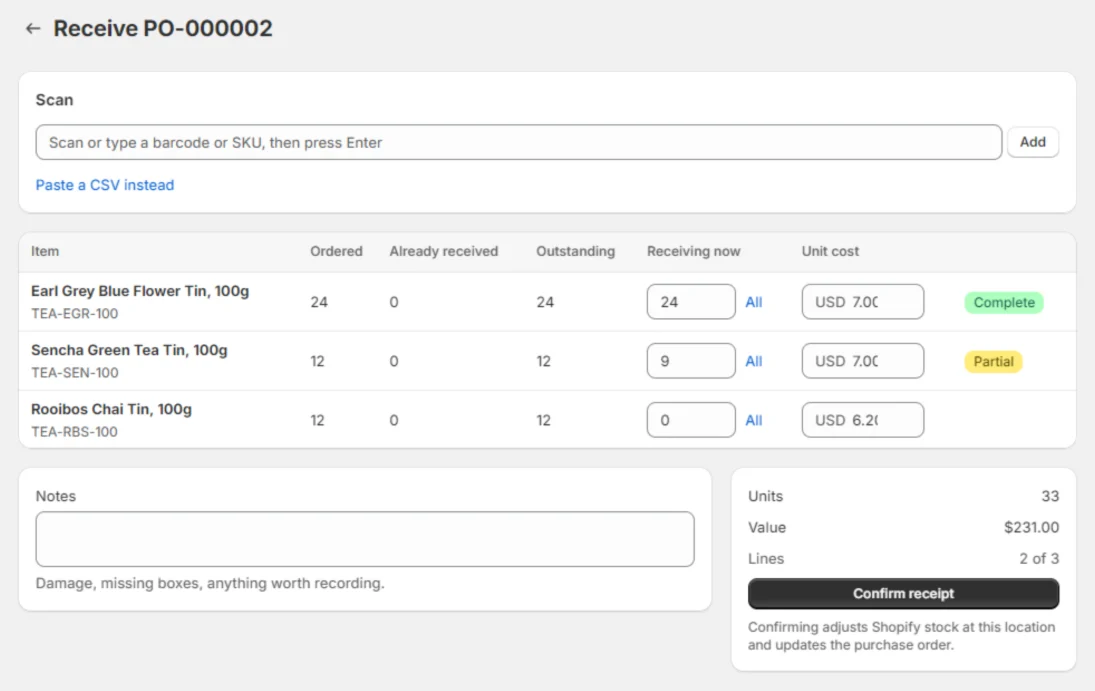
Open the PO, scan each barcode as it comes out of the box. Restock counts up against what was ordered and marks each line complete or partial as you go.
Confirming the receipt adjusts Shopify stock at that location and updates the PO. Short-shipped? Receive what turned up and leave the rest outstanding.
Purchase orders
Draft, send, chase, reconcile.
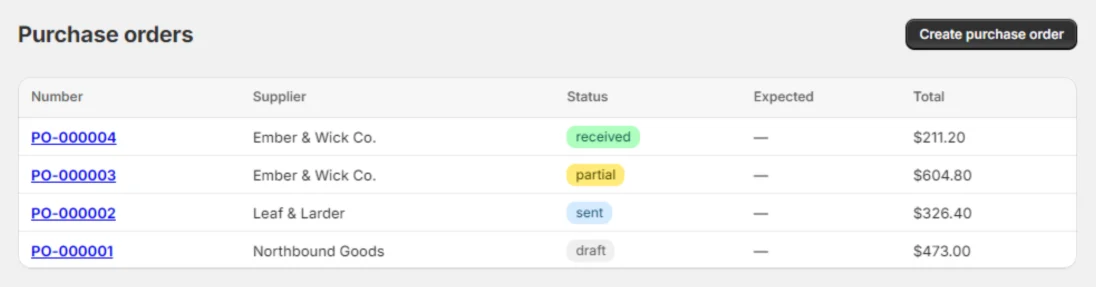
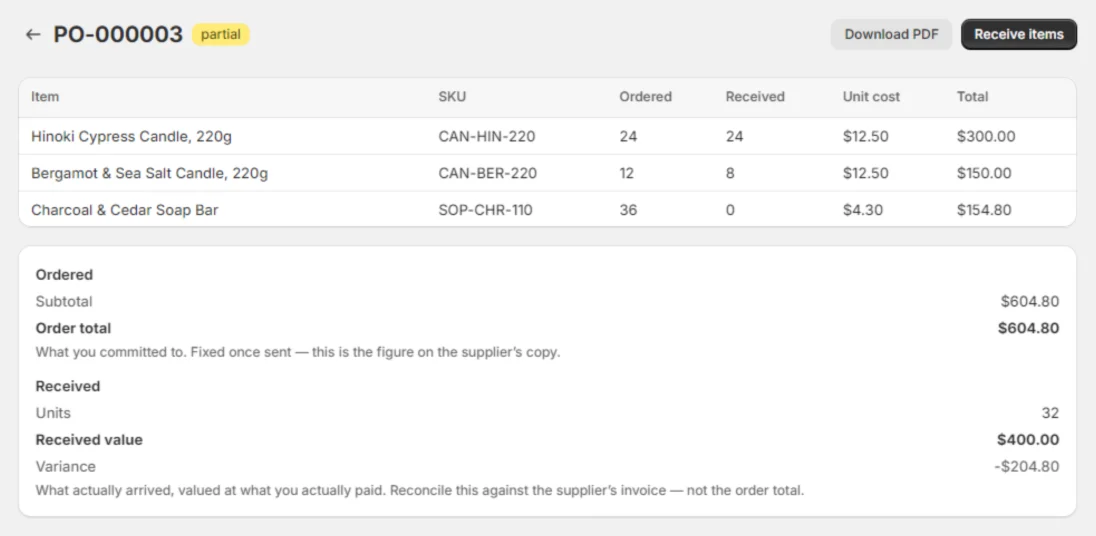
Build a PO against a supplier, download it as a PDF or email it straight to them. Statuses run draft → sent → partial → received, so the list tells you what you’re still waiting on.
The order total is fixed once sent — that’s the figure on the supplier’s copy. Received value is separate, because that’s what you actually pay for.
Stocktakes
Count a section, see what’s missing.
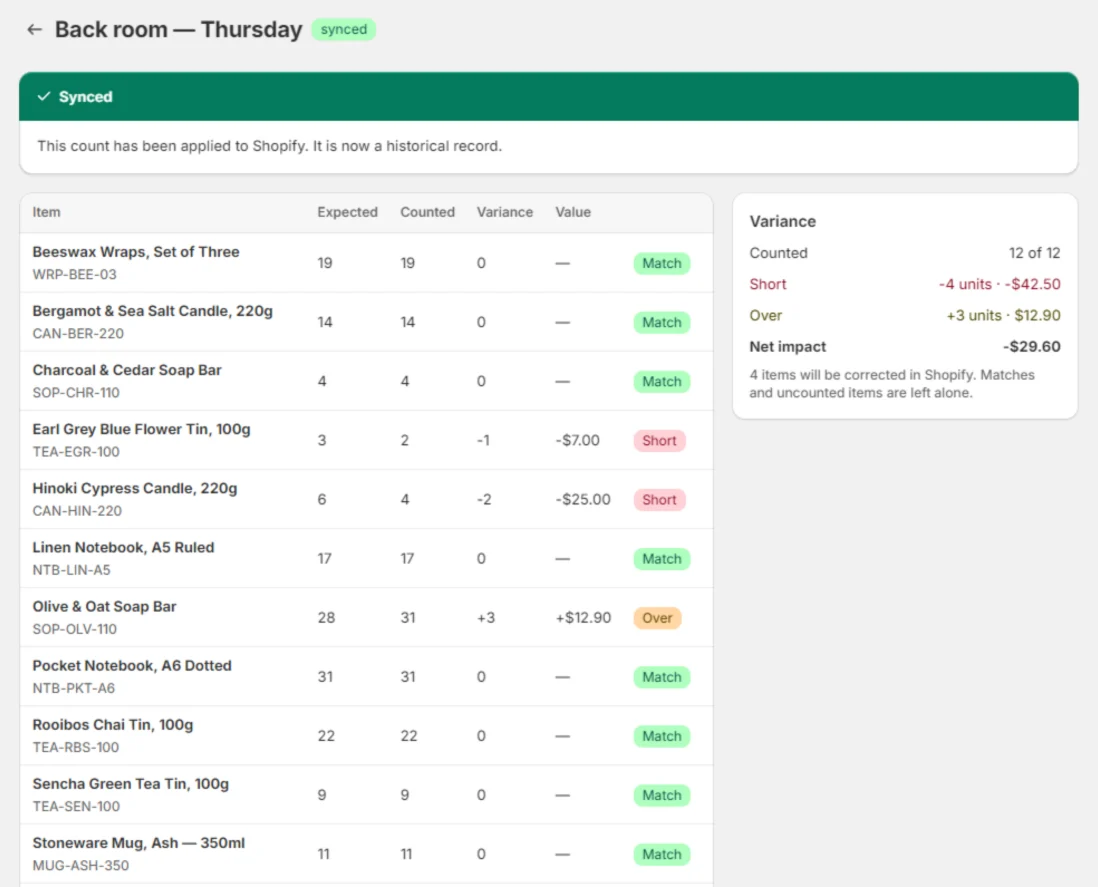
Scan a shelf or a back room into a count. Every line shows expected against counted, the variance in units, and what that variance is worth at cost.
Apply it and only the items that moved are corrected in Shopify — matches and anything you didn’t count are left alone. The count stays as a historical record.
Low stock
Arithmetic, not a forecast.
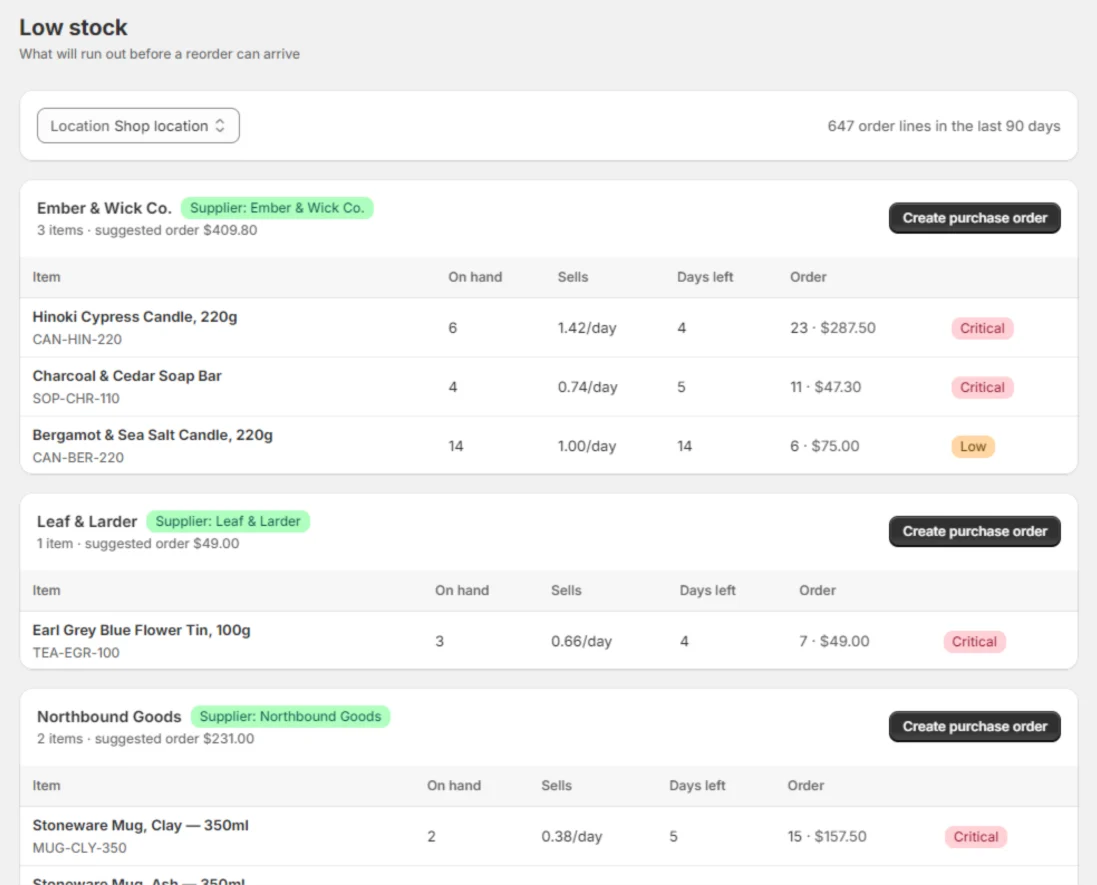
Units on hand, units sold per day over the last 90 days, days of cover left. That’s the whole model. No seasonality curves, no confidence intervals, nothing you have to trust blind.
Grouped by supplier, because that’s how you actually place an order. One button turns a group into a draft PO.
Labels
Avery sheets, ordinary printer.
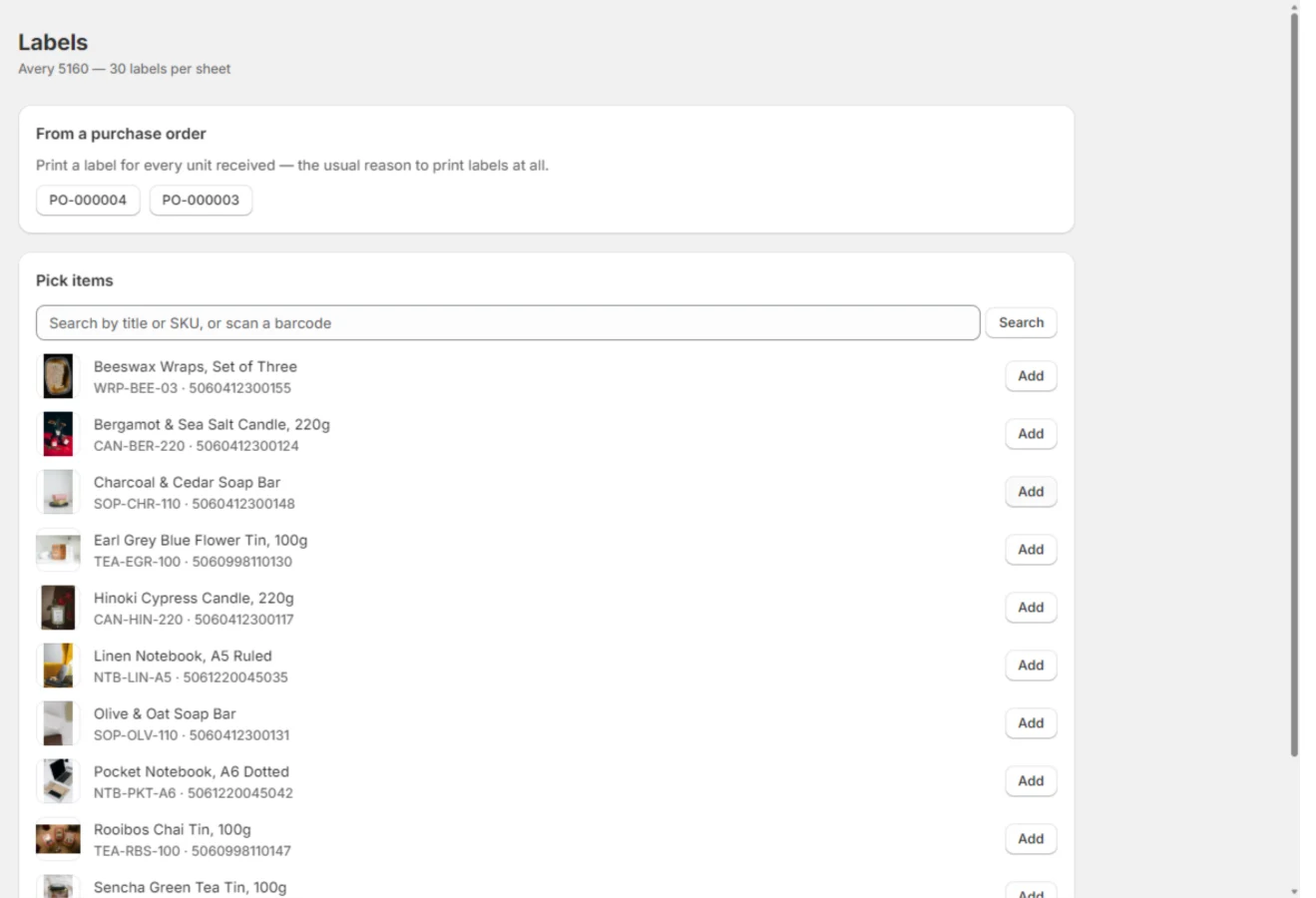
Print a label for every unit received, straight off the PO, or pick items by hand. Restock produces an Avery 5160 PDF — 30 to a page — for the printer you already have. It does not drive dedicated label printers.
Setup
It reads your store, not the other way round.
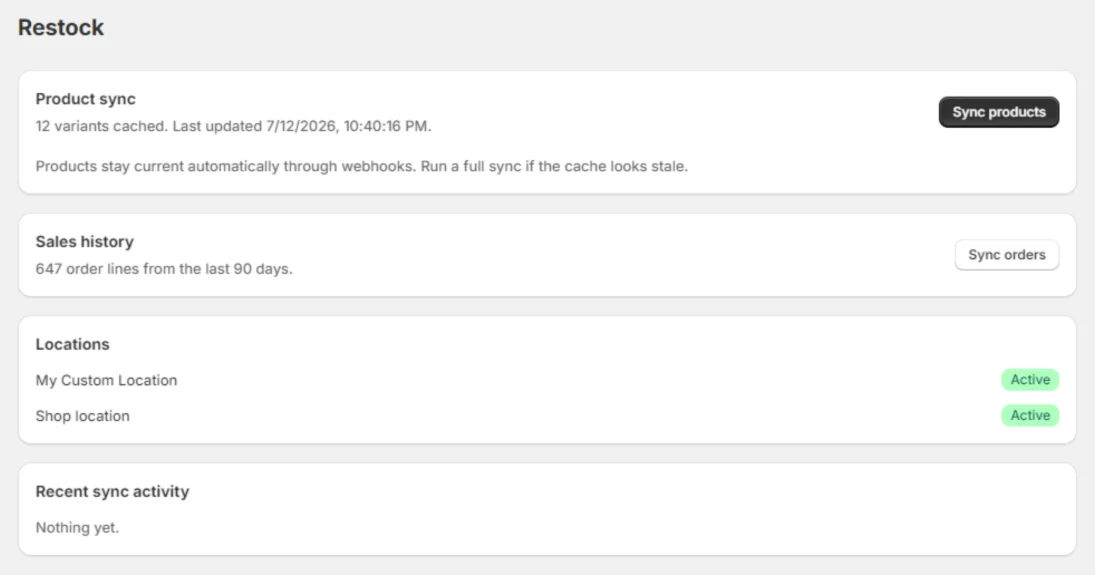
On install, Restock caches your variants and the last 90 days of order lines, and picks up your Shopify locations. Products stay current through webhooks. Nothing to configure before you can raise your first PO.
03 — The alternatives
Where the other routes fall short.
| Workflow | Restock | Shopify native | Prediko | EasyScan |
|---|---|---|---|---|
| POs emailed to suppliers | ✓ Included | ✕ Can’t email POs | ✓ | $79.99/mo tier |
| Barcode receiving of POs | ✓ Included | ✕ Not supported | — | ✓ |
| Stocktake workflow | ✓ Guided, with variances | CSV export/import only | — | — |
| Labels from a PO | ✓ Included | ✕ Not supported | — | ✓ |
| Pricing | From $29 flat | Free, built in | From $49/mo, scales with revenue | POs from $79.99/mo |
| Built for | Retail stores on POS | Online-first basics | DTC forecasting | Barcode utilities |
Shopify capabilities per Shopify’s own Stocky migration guide; competitor details from public listings. “—” = not offered or not a stated focus.
04 — Pricing
Flat. Not priced on your revenue.
Both plans include unlimited purchase orders, stocktakes and labels. The only question: how many locations.
Standard
$29 /month
For single-location stores.
Plus
$59 /month
For stores with more doors.
14-day free trial on both plans. Switch plans or cancel any time from your Shopify admin.
05 — Leaving Stocky
Three things to read before you move.
Written to be useful whether or not you install anything. The export guide in particular is worth doing today — those files stop being available when the app goes.
Do this first
Export your Stocky data
Every file worth pulling out — suppliers, POs, cost history, barcodes — where to find it, and what each one contains.
Read the export guide →Then this
Migrate from Stocky
Export, install, import, verify your counts, go live. With an honest list of what doesn’t come across.
Read the migration steps →Still deciding
Stocky alternatives
Stocky against Restock feature by feature, and against the other routes — including the free one.
Compare the options →Get the Stocky data-export checklist by email
A one-page list of every file to pull out of Stocky before it goes, in the order that makes the import easiest. No install required, and nothing else sent.
Enter a valid email address.
One email, the checklist, nothing else. Privacy.
On its way. Check your inbox — and the full export guide is right here if you’d rather start now.
06 — Questions
The practical stuff.
When can I start using it?
Now. Restock is live on the Shopify App Store — install it from your Shopify admin and the 14-day free trial starts straight away. No invite, no queue, nothing to join.
Can I bring my data over from Stocky?
The working set, yes. Your open purchase orders come out of Stocky as CSV. Your supplier list does not — Shopify states plainly that suppliers can’t be exported from Stocky — so that one gets copied out by hand. Restock’s guided importer takes both. If the files don’t line up, email hello@restockpos.com and we’ll do the mapping with you rather than send you a help article. The migration guide has the full sequence.
What actually happened to Stocky on Aug 31?
Shopify retired the app: it has stopped working. But Shopify also says you keep read-only access to export your data for at least 90 days after that date, so the history was not deleted on the 31st. What did end that day, with no grace period, was the Stocky API — and suppliers cannot be exported through the interface at all, which makes your supplier list the one genuinely urgent job. Anything living in Shopify — products, barcodes, cost per item, inventory levels — stays where it is. The export guide has the order to do it in.
Does it work with Shopify POS?
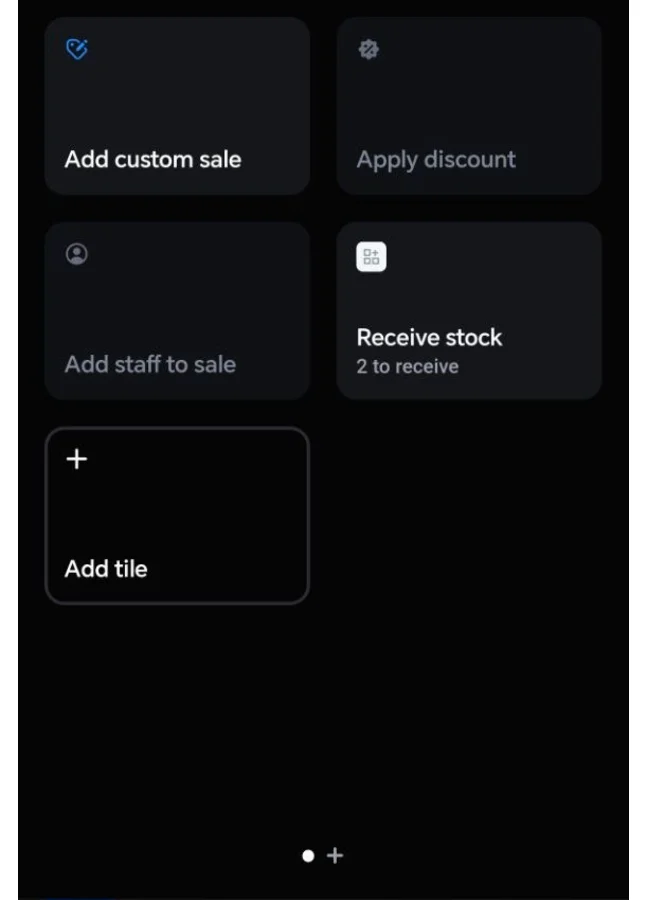
Yes — Restock is built for retail stores running Shopify POS. Add the Receive stock tile to your smart grid and receive deliveries at the till. The barcode scanners you used with Stocky work with Restock; there is no new hardware to buy.
What does it cost? Is there a trial?
$29/month for one location, $59/month for unlimited locations. Both plans include a 14-day free trial and the Stocky importer. Flat — never priced on your revenue or your order volume. Cancel from your Shopify admin.
Does Restock do demand forecasting?
No, and it is not planned. The low-stock report is arithmetic on your own sales: units sold per day over the last 90 days, days of cover left, and a suggested order quantity you can edit. There are no seasonality models and no forecast dashboards.
What label printers does it support?
Restock produces Avery 5160 label sheets as a PDF — 30 labels to a page — which you print on any ordinary office printer. It does not drive dedicated label printers.
What support do you offer?
Email support on both plans, priority response on Plus. Through migration season that means hands-on help with your Stocky export files, from people who know what Stocky put in them.
Stocky shuts down Aug 31 Stocky is offline
Switch once. Keep working.
Install from the Shopify App Store, bring your suppliers and open POs across, and raise your next purchase order the same afternoon. Free for 14 days — no card beyond the one Shopify already has.
apps.shopify.com/restock-10
Bringing a Stocky export with you? Send it to hello@restockpos.com and we’ll map the columns with you.