Migration · Export → install → import → verify → live
Migrating from Stocky to Restock
Five steps, in order, with the awkward parts left in. Stocky closes on August 31, 2026;Stocky closed on August 31, 2026; the move itself is an afternoon, and most of that afternoon is one job Stocky won’t do for you.
If you have not got your data out yet, start with the Stocky export guide — it is the longer version of step one, and it is written to be useful even if you end up somewhere other than here.
What actually moves. Your suppliers and your open purchase orders. That is the working set — enough to buy stock on Monday.
Your products, barcodes, cost per item and inventory levels don’t need to move at all: they are Shopify’s records, and Restock reads them from your store. Your Stocky history — closed POs, past stocktakes, the average unit cost Stocky computed — does not come across, and it does not come across into Shopify’s own tools either. Keep the exports as an archive.
What imports, and what doesn’t
The straight version, before you spend an afternoon on it.
| Thing | Into Restock | How |
|---|---|---|
| Suppliers | ✓ Imported | Your hand-built list, as CSV or pasted. Stocky has no supplier export. |
| Open purchase orders | ✓ Imported | Line items, quantities and unit costs, raised as live POs against the matching supplier |
| Products, variants, SKUs | ✓ Read live | From Shopify on install — no import, nothing to map |
| Barcodes | ✓ Read live | A Shopify variant field. Scanners work the moment you install. |
| Cost per item | ✓ Read live | From Shopify. Restock does not overwrite it behind your back. |
| Inventory levels | ✓ Read live | From Shopify, per location |
| Closed / historical POs | ✕ Not imported | Nowhere takes these — Shopify’s own tools included. Keep the CSVs. |
| Past stocktakes | ✕ Not imported | Archive them out of Stocky. New counts start clean in Restock. |
| Stocky’s average unit cost history | ✕ Not imported | Shopify keeps one static cost per variant; there is no field for the history |
| Saved Stocky reports and settings | ✕ Not imported | Rebuild the two or three you actually read |
The five steps
-
Export what only exists in Stocky
Two files matter for the move: your supplier list and your open purchase orders. Everything else you export is for the archive.
The supplier list is the awkward one, and it is why this step takes an hour rather than five minutes. Shopify states that “Suppliers can’t be exported from Stocky” — no button, no report — so the list has to be copied out by hand into a spreadsheet: name, company, contact, email, phone, address, account number. Stocky’s API could reach suppliers, but Shopify said “Any Stocky APIs will stop working on August 31, 2026,” and they did — so that route is closed.
Open POs come out one at a time from Apps → Stocky → Purchases: click the PO number, then Download, then CSV. You only need the ones still outstanding — the closed ones are archive.
The full export guide covers the reports worth keeping, the stocktake exports, and the irreversible cost-sync setting to decide about first.
-
Install Restock and let it read your store
Install from the Shopify App Store listing. The 14-day trial starts on install; there is no card to enter beyond the one Shopify already has, and no call to book.
On first open, Restock caches your product variants and the last 90 days of order lines, and picks up your Shopify locations. Products stay current through webhooks after that. This is the whole of setup — there is no product import, because your catalogue never left Shopify.
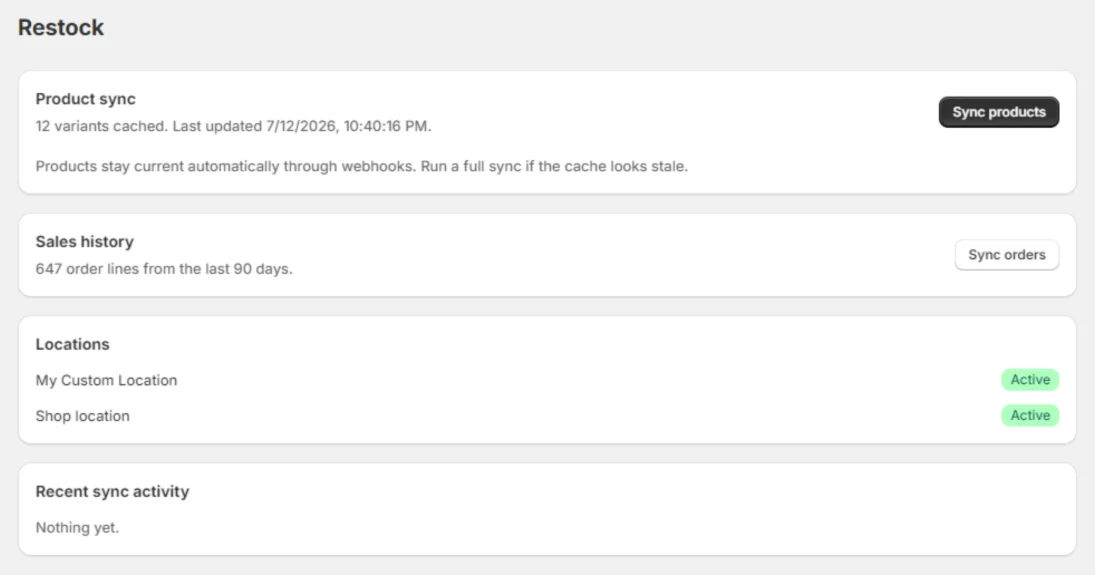
The first screen after install. If the variant count and the locations look right, the sync worked. -
Bring your suppliers and open POs through the importer
The importer is guided: you upload or paste a file, it shows you which column it thinks is which, and you correct it in the preview before anything is written. Suppliers first, then open purchase orders, so the orders have suppliers to attach to.
Stocky files come out of different reports in different shapes, and a hand-built supplier spreadsheet comes out in whatever shape you built it. If the mapping fights you, stop and send the file to hello@restockpos.com — we will do it with you. That offer is not a formality: a supplier list is an hour of your work and it is a bad thing to lose to a column mismatch.
-
Verify the counts before you trust them
Do this while Stocky is still open in the other tab. It takes ten minutes and it is the difference between a migration and a hope.
- Supplier count. Same number in Restock as in your spreadsheet? Spot-check three: email, address, account number.
- Open PO count. Same number of outstanding orders, and the same total outstanding units on the two or three biggest.
- Unit costs. Open one imported PO and check a line’s unit cost against the Stocky PDF. Costs are what your margins are made of.
- Inventory. Pick one location and one shelf you can physically see. Restock reads inventory from Shopify, so this is really a check that you are looking at the right location — which is the mistake people actually make.
If a number is off, it is almost always a column mapped to the wrong field. Re-run the import rather than patching by hand.
-
Go live: raise the next PO in Restock
Add the Receive stock tile to your Shopify POS smart grid so staff can receive at the till, then raise your next purchase order in Restock and email it to the supplier as a PDF.
One rule while both apps still exist: receive each delivery in one place only. Both adjust Shopify stock, so a PO received in both is counted twice. Pick a date, raise everything new in Restock from then on, and finish in-flight Stocky orders where they started.
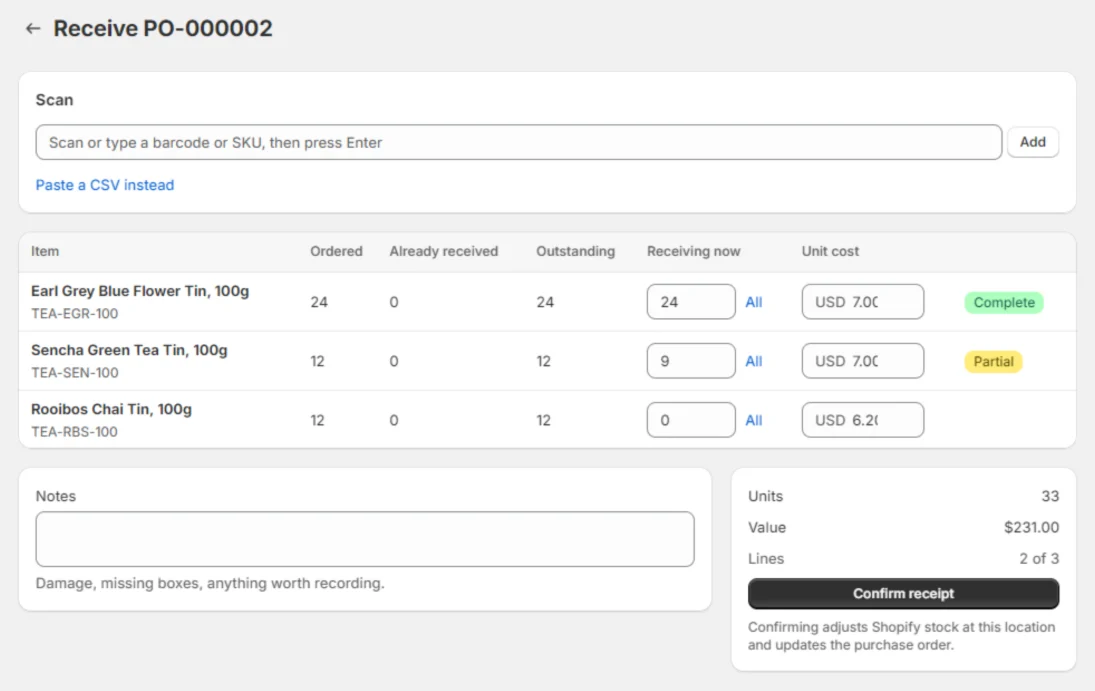
The first receipt is the moment it stops being a migration and starts being Tuesday.
If you would rather not do it alone
Email hello@restockpos.com with your export files attached and we will map them with you — same day during migration season. We will tell you what is in each file, what will import cleanly, and what you are about to lose regardless of which app you pick, which is usually the more useful half of the answer.
There is no upsell attached to that. If your answer turns out to be Shopify’s native purchase orders, or another app entirely, we would rather you knew before you spent the afternoon. The comparison page lays out where each route falls short, including ours.
Migration questions
How long does the move actually take?
An afternoon for a single-location store, most of which is copying the supplier list out of Stocky by hand. Installing Restock and syncing your catalogue takes minutes; the importer takes as long as your files need checking. The part that takes real time is the part Stocky won’t automate for you.
Does my Stocky history come across?
No, and nowhere else will take it either. Shopify says historical purchase orders can’t be imported into Shopify, and its own CSV upload can’t carry past statuses, received quantities or supplier links. Keep your Stocky exports as an archive. What moves is the working set: suppliers and open orders.
Do I need to re-scan or re-enter my products?
No. Products, barcodes, cost per item and inventory levels are Shopify data — Restock reads them from your store on install and keeps products current through webhooks. There is no product import step, because there is nothing to import.
What if my export files don’t line up?
Email them to hello@restockpos.com and we’ll do the mapping with you. The importer is guided rather than magic, and Stocky files come out of different reports in different shapes. We would rather sit with your file for twenty minutes than have you lose a supplier list to a column mismatch.
Can I run Stocky and Restock side by side while I switch?
You can install Restock while Stocky is still there, and during the trial that costs you nothing. Be careful about receiving the same delivery in both, though: each one adjusts Shopify stock, so a PO received twice is counted twice. Pick a date, raise everything new in Restock from then on, and finish the in-flight Stocky orders where they started.
I already missed August 31. Can I still move?
Yes. Shopify says you keep read-only access to export your Stocky data for at least 90 days after the shutdown, so your supplier list and purchase orders are likely still reachable. Get them out, then start at step two. And nothing about installing Restock depends on Stocky still existing — your catalogue and inventory come from Shopify.