Comparison · Stocky vs Restock
A Stocky alternative for retail stores on Shopify POS
Shopify retires Stocky on August 31, 2026.Shopify retired Stocky on August 31, 2026. This page is the workflow-by-workflow version of what that means: which parts of Stocky Restock rebuilds one for one, which parts are genuinely different, which parts we deliberately don’t do — and where the other routes, including the free one, fall short.
We make Restock, so read the “where Restock falls short” section with that in mind. It is there because the fastest way to waste your afternoon is to switch to the wrong tool.
The reason this is hard: Stocky was four tools
Stocky bundled several distinct jobs into one free app, and most replacements do one or two of them well. That is the whole difficulty of replacing it. Broadly, it was:
- A buying tool — suppliers, purchase orders, emailing a PO to the supplier.
- A receiving tool — scanning a delivery in against the order it belongs to, at the counter.
- A counting tool — stocktakes, variances, adjustments.
- A planning tool — reorder suggestions, forecasting, cost history.
Work out which of those four you actually used day to day before you look at any alternative. Most retail stores lean hardest on 1–3 and barely touched 4; forecasting-first stores are the opposite, and should be looking at a planning app rather than at us.
Restock covers 1, 2 and 3, plus the reordering half of 4. It does not do forecasting, and it is not going to.
Stocky vs Restock, workflow by workflow
| What you did in Stocky | In Restock | Notes |
|---|---|---|
| Keep supplier records | ✓ Same | Imported from your list. Stocky has no supplier export, so that list is one you build by hand — see the export guide. |
| Raise a purchase order | ✓ Same | Draft → sent → partial → received, per supplier, with unit costs |
| Email the PO to the supplier as a PDF | ✓ Same | The workflow Shopify’s native purchase orders don’t have |
| Receive a delivery by scanning against the PO | ✓ Same | At the till on Shopify POS, or in the admin |
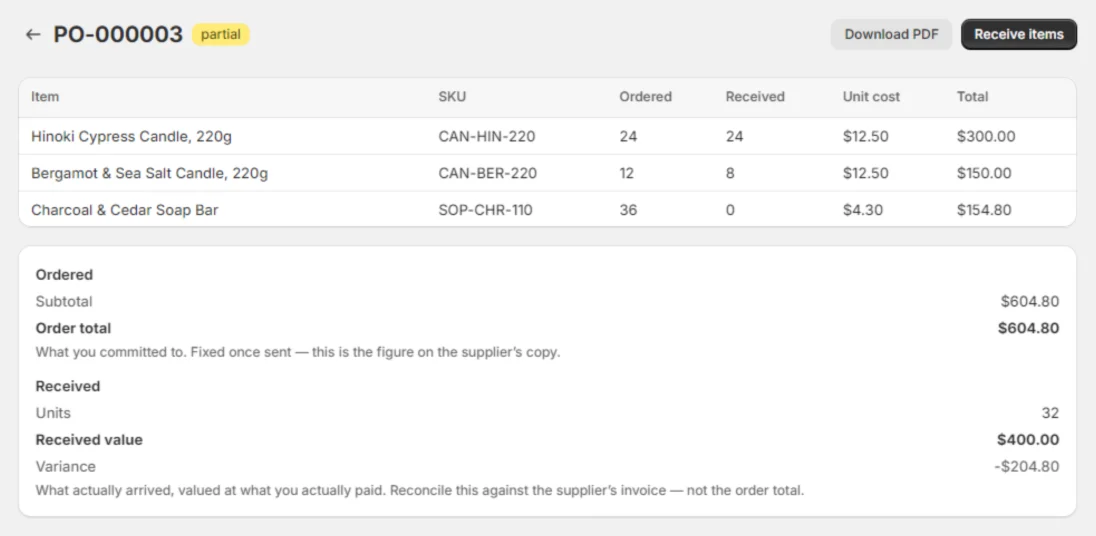
| Handle a short shipment | ✓ Same | Partial receipts; ordered against received value, so you reconcile the invoice for what arrived |
| Run a stocktake with variance review | ✓ Same | Count, review expected against counted in units and value, then apply |
| Print barcode labels from a PO | Different | Avery 5160 PDF sheets, 30 to a page, on an ordinary printer — not a dedicated label printer |
| See what to reorder | Different | A low-stock report from your last 90 days of sales, grouped by supplier — no forecasting model |
| Demand forecasting, seasonality, min/max | ✕ Not offered | Deliberate. A planning app is the right tool for this. |
| Transfer stock between locations | ✕ Not offered | Shopify moved this into its own admin — Products → Transfers — before the shutdown |
| Weighted average unit cost / cost history | ✕ Not offered | Restock reads Shopify’s single Cost per item. Shopify has no field for the history either. |
| Look up an old PO or stocktake | ✕ Not imported | No replacement takes Stocky’s history. Export it and keep the files. |
Where Restock falls short
The honest list, so you find out here rather than three weeks in.
- No demand forecasting. No seasonality, no min/max replenishment, no auto-generated POs from a model. If that was your Stocky, look elsewhere — genuinely.
- Labels are Avery sheets, not a label printer. A PDF at 30 labels to a page, for an office printer. If your shop runs on peel-off rolls from a dedicated printer, this is a change to your bench, not just to your software.
- No stock transfers between locations. Shopify’s own Transfers page does that now, and does it well enough that duplicating it would be silly.
- No cost history. One cost per variant, Shopify’s. If you run landed-cost or weighted-average accounting, that needs to live in your accounting system.
- No import of your Stocky history. True everywhere, but it is still a loss and we would rather name it than let you discover it.
- No reviews yet. The app went on the App Store on August 20, 2026. There is no rating to point at, and we are not going to manufacture one. What we can point at is the app itself — the screenshots on the homepage are real screens, and the trial is 14 days with nothing to cancel by phone.
The routes merchants actually weigh
Four realistic options for a retail store, and where each one stops.
| Workflow | Restock | Shopify native | Prediko | EasyScan |
|---|---|---|---|---|
| POs emailed to suppliers | ✓ Included | ✕ Can’t email POs | ✓ | $79.99/mo tier |
| Barcode receiving of POs | ✓ Included | ✕ Not supported | — | ✓ |
| Stocktake workflow | ✓ Guided, with variances | CSV export/import only | — | — |
| Labels from a PO | ✓ Included | ✕ Not supported | — | ✓ |
| Pricing | From $29 flat | Free, built in | From $49/mo, scales with revenue | POs from $79.99/mo |
| Built for | Retail stores on POS | Online-first basics | DTC forecasting | Barcode utilities |
Shopify capabilities per Shopify’s own Stocky migration guide and Help Center; competitor details read from their public App Store listings on August 20, 2026. “—” = not offered or not a stated focus.
Shopify’s own tools — the free route
Start here if you can. Purchase orders and transfers are in the Shopify admin at no extra cost, and for a store that mostly needed a record of what was on order, that may be the end of the conversation.
Three places it stops, all of them at the counter rather than at the desk:
- It cannot email a purchase order to a supplier. Shopify’s documentation describes exporting the PO as a PDF that you then attach to your own email. Its marketing page says “create, send, and track”; the help centre only documents the export.
- Receiving stock by scanner at the till is a POS Pro feature — as is Quick count. Since Stocky itself came bundled with POS Pro, most stores reading this already have it, but it is worth knowing the gate exists.
- Quick count applies adjustments when you submit. Reconciliation is an after-the-fact report rather than a review-and-approve screen, and each session is capped at 1,000 variants.
Label printing is a separate free Shopify app that handles Avery sheet formats — but it cannot print from Shopify POS, and it cannot print from a purchase order, which is the one moment you actually want labels.
Prediko — if forecasting was your Stocky
A planning and forecasting tool, priced in revenue bands: Starter $49/month up to $100k, Scale-up $119/month up to $500k, Growth $199/month up to $2M, then custom. That model means the bill grows with the business rather than with how much you use it.
Right answer if buy-planning was the part of Stocky you relied on. Wrong shape if what you needed was someone scanning a carton at the counter on a Tuesday.
EasyScan — if the scanner was your Stocky
Scanner-first, and flat-priced: Basic $9.99, Standard $39.99, Advanced $79.99, Pro $129.99 per month. Barcode label printing is in from the cheapest tier; purchase orders unlock at Advanced, $79.99/month, which is the number that matters if POs are why you are here. Its listing title also advertises stocktakes, though none of the four tiers’ feature lists name them — worth confirming which tier includes them before you subscribe.
And a crowded field beyond those
Several other apps now market themselves directly as Stocky replacements — Purchase Order Hero, Alfred, Assisty, Stockroom and ChannelBay among them, some with free tiers. We have not used them and are not going to rank them for you. The useful advice is the boring kind: work out which of Stocky’s four jobs you actually did, then check that against the tier you would actually be on, not the headline price.
On “no forecasting” — what you get instead
Worth being concrete, because “no forecasting” sounds like a hole.
Restock’s low-stock report shows units on hand, units sold per day across the last 90 days, days of cover left, and a suggested order quantity — grouped by supplier, with a button that turns a group into a draft PO. That is the whole model: division. No seasonality curve, no confidence interval, nothing you have to take on trust, and nothing that quietly reorders for you.
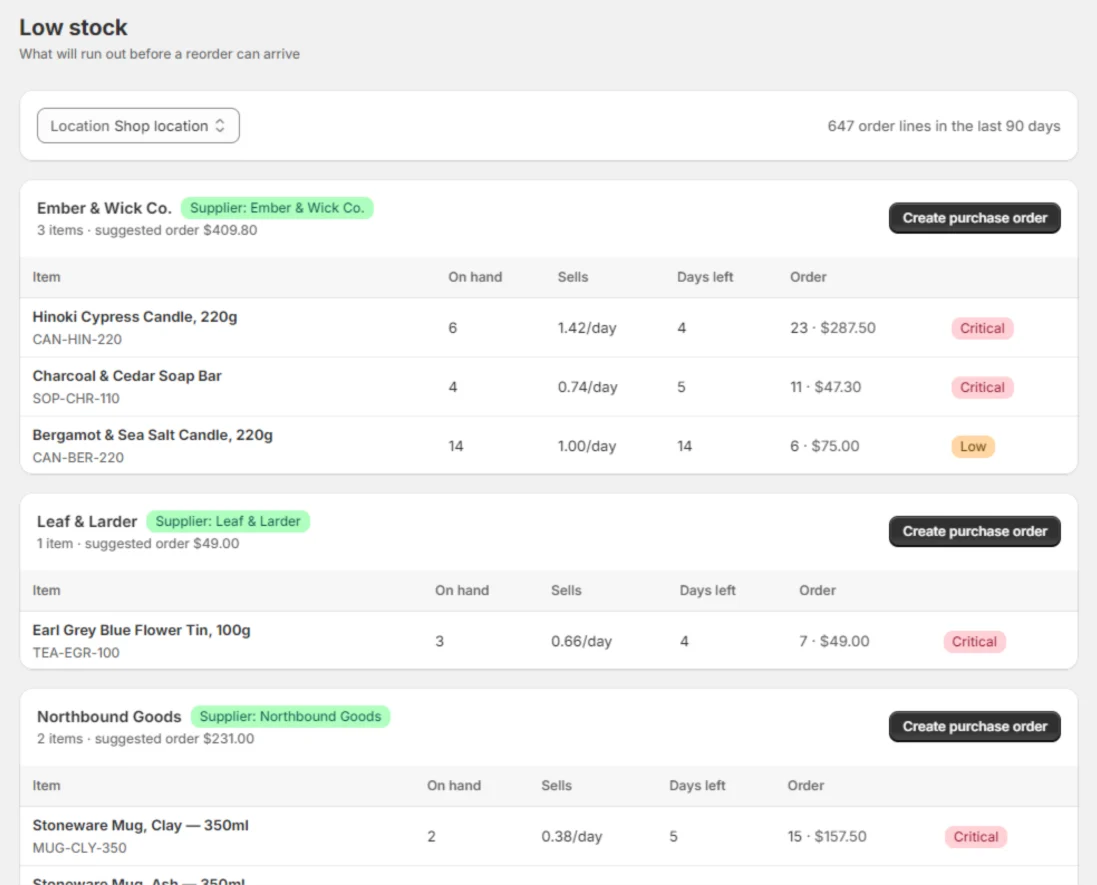
If you want a model, buy a planning tool. If you want a shelf that isn’t empty on Saturday, this is the report you wanted.
What it costs
Stocky was bundled with Shopify POS Pro at no separate charge, so every replacement is a new line on the bill. There is no honest way to dress that up.
Restock is $29/month for one location and $59/month for unlimited locations. Flat — not a percentage of revenue, not banded by order volume, not a per-seat charge. Both plans include everything: unlimited purchase orders, stocktakes and labels, barcode receiving on POS, and the Stocky importer. Both start with a 14-day free trial, and you cancel from your Shopify admin like any other app.
The reason it is flat: an inventory app that charges on revenue costs you more for growing without doing anything more for you. Full pricing is on the homepage.
How the switch goes
Export what only exists in Stocky, install Restock, bring your suppliers and open POs through the guided importer, verify the counts, then raise your next PO in the new place. An afternoon for a single-location store — and most of that afternoon is copying out the supplier list Stocky won’t export.
The migration page has the five steps in full, including the bit where you check the numbers against Stocky before you trust them. The export guide comes first if you have not got your data out.
Stocky alternative questions
Is there a free Stocky alternative?
Shopify’s own inventory tools are the free route, and for some stores they are genuinely enough — you get purchase orders and transfers in the admin at no extra cost. Where they stop is the counter: Shopify cannot email a purchase order to a supplier, receiving stock by scanner at the till is a POS Pro feature, and printing labels is a separate app that cannot print from POS or from a purchase order. A few paid apps also advertise free tiers. Try the free route first if the gaps above don’t matter to you.
Can Shopify’s native purchase orders replace Stocky?
Partly. Shopify has purchase orders and transfers in the admin, and Quick count on POS Pro for counting stock. The gaps that matter to a shop are: no emailing a PO to a supplier — Shopify’s documentation describes exporting a PDF you attach to your own email; no label printing from POS or from a purchase order; and Quick count applies adjustments when you submit, so variance review is after-the-fact reporting rather than a review-and-approve step.
Does Restock do demand forecasting like Stocky did?
No. If forecasting was the part of Stocky you relied on, Restock is the wrong tool and a planning app like Prediko is a better fit. What Restock has is a low-stock report: units on hand, units sold per day over the last 90 days, days of cover left, and a suggested order quantity you can edit, grouped by supplier. That is arithmetic on your own sales, not a model.
Does Restock print barcode labels like Stocky did?
It prints Avery 5160 sheets as a PDF — 30 labels to a page — straight from a purchase order or by picking items, on whatever office printer you already have. It does not drive dedicated label printers. If your shop runs on a label printer rather than sheets, that is a real difference worth knowing before you switch.
What does Restock cost compared to Stocky?
Stocky came bundled with Shopify POS Pro at no separate charge, so anything you move to is a new line on the bill — there is no honest way around that. Restock is $29/month for one location and $59/month for unlimited locations, flat. It is never priced on your revenue or your order volume, which is the main way inventory apps get expensive as you grow. Both plans have a 14-day free trial.
Will my Stocky data move across?
Your suppliers and open purchase orders will, through a guided importer, with hands-on help if the files fight you. Your history won’t — Shopify says historical purchase orders can’t be imported into Shopify, and that applies to every replacement, not just this one. Products, barcodes, cost per item and inventory levels never move at all, because they are Shopify’s records and Restock reads them from your store.